At the time of this writing, Marco Cantù and I have completed the US part of our 2011 Delphi Developer Days tour, and are beginning the European part at the end of next week (yes, there are a few seats available in each city. If you are interested in attending, you must act soon. Otherwise, you’ll have to wait until next year). One of the benefits of Delphi Developer Days is that we limit registration to just over 30 people in each city, which ensures that we have a sufficient number of attendees to stimulate discussion and networking, but few enough that every attendee has the opportunity to talk with Marco and me on a one-on-one basis.
At our Baltimore stop in April, one of the attendees approached me with a problem that he encountered during his attempt to convert his commercial application from using the Borland Database Engine (BDE) to the Advantage Database Server (ADS). (This is the most logical and easiest migration for BDE developers, in my opinion).
In his tests, the AdsQuery (the ADS equivalent to the BDE Query) did not treat the RecNo property the same as other DataSets. In all other DataSets, he noted, RecNo reports the position of the current record within the current DataSet with respect to the order of the records in the DataSet. For example, in a ClientDataSet, a Query, or a SQLDataSet, RecNo will be equal to 1 when you are on the first record of the DataSet, which is the default when you first open the DataSet, regardless of which index you’ve select (ClientDataSet) or SQL ORDER BY clause (Query or SQLDataSet) you are using.
“There must be a way around this,” he conceded, “since the Advantage Data Architect can report the correct record position for records in queries that include in an ORDER BY clause.”
I put together a simple test between sessions, and confirmed his observation that RecNo, at least using the default settings of the AdsQuery, did in fact return the position of that record within the underlying table, and not the position of the record in the current record order. As a result, when an AdsQuery that employs an ORDER BY clause is first opened, RecNo for the current record (the first record in the view) might 55, or 1,002,837, or whatever position that first record occupies in the underlying table, regardless of the order of that record’s position in the result set.
RecNo has an additional use, as well. RecNo can be used to navigate a DataSet (at least in DataSets that support navigation). Specifically, if you set RecNo to 1, the DataSet navigates to record 1 in the current sort order. However, with the AdsQuery in my test, setting RecNo to 1 navigated to the first record in the underlying table, which is not necessary the first record in the indexed or sorted order of the result set.
I had not seen this problem before, and I didn’t solve the problem on the spot. However, I did say that I would try to understand the issue better, and report my results to the Advantage team if I could not find an acceptable solution.
I’ve been very busy, but I finally found time to put together a demonstration of the issue. It confirmed that in the default configuration, the AdsQuery.RecNo property is associated with a record’s true position in the underlying table. However, after some poking around, I found two properties that change this behavior. Specifically, when you set an AdsQuery’s Sequenced property to True, and its SequenceLevel property to slExact, the AdsQuery treats RecNo the same as all other DataSets I tested.
I imagine that there is a performance explanation for the default values of the AdsQuery properties. Specifically, so long as you don’t need to use the RecNo property to determine the view-specific position of a record in a result set, and do not need to use it to perform view-specific navigation, the default property values result in faster query performance. When the standard DataSet.RecNo behavior is required, however, the extra overhead is worth the benefit. So, if you are using Advantage, and need the AdsQuery.RecNo property to behave the DataSet way, all you need to do it tweak its properties a bit.
I am sharing this story for two reasons. First, I hope that this post helps the next Advantage user who runs into this problem. Second, it demonstrates added value that Marco and I bring to Delphi Developer Days. I can’t promise that we can solve every problem for you, but we are there to listen, and we do our best to offer suggestions for solutions.
Thursday, May 5, 2011

Monday, April 25, 2011
Live Templates Revisited
While code templates have been in Delphi since Delphi 4, they seem simple compared to the new live templates feature first introduced in Delphi 2006. Live templates provide self-describing, intelligent code insertion, and interactive navigation to the variable parts of the template. If you are not using them now, it's time to take another look.
Consider the inserted template shown in the following figure. This template was created by executing the forb template, which inserts a for loop with a begin..end block.
 Notice that initially the I (the loop iteration variable) is highlighted. This permits you to immediately edit the variable name, if you like. For example, many Delphi developers use a lowercase variable named i as their loop iterator (even though Delphi itself is case insensitive).
You will also notice that the I, as well as the 0 and List.Count appear as bordered text. These bordered text areas represent the sync points of the live template. After changing I to i, press Tab or Shift-Tab to navigate between the sync points of the template. As you navigate, you will notice that the hints change to describe the role of the currently selected point.
The following figure shows the same live template shown in the preceding figure after you have navigated to the third variable part.
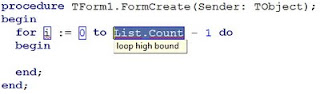
Many live templates, such as the forb template, also support intelligent code insertion, or active scripting. With active scripting, code executes when you insert or interact with the template, conditionally performing one or more tasks for you. In the case of the forb template, if the function in which you insert this template does not already contain a declaration for the loop iterator variable, one will be inserted for you once you press the Tab key after completing all sync points. The following code segment depicts how a previously empty method might look after the execution of the active script associated with the forb live template.

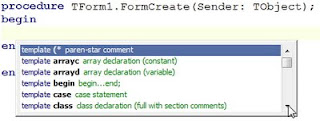
Regardless of a live template's definition, you can invoke a live template on demand by positioning your cursor within the editor where you want to place the live template and press Ctrl-J. Delphi responds by displaying the Insert Template menu, shown in the following figure. Select the template you want to insert from this menu and press Enter.
Similarly, you can begin typing the first few characters of the template shortcut name before pressing Ctrl-J. If only one template's shortcut name matches the characters you've typed, that template is selected and inserted, without the Insert Template menu being displayed. If two or more template shortcut names match what you've typed, the Insert Template menu appears, though only the matching template names are shown, in which case you then select which of the displayed templates you want and press Enter.
Automatic invocation is available when a live template and Delphi are both configured for it. For those live templates that include the invoke="auto" attribute in the template element of the template definition, auto completion is available when the Code templates completion and Auto complete checkboxes are checked on the Code Insight table of the Options dialog box. You display this dialog box by select Tools
Options from Delphi's main menu.
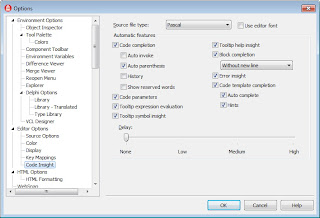
With automatic live template invocation, live templates are inserted when you type the name of a template shortcut and press Tab, Spacebar, or Ctrl-J. For example, if you type forb and press Tab with code templates completion enabled, the forb live template is instantly inserted into your code at the position of your cursor.
Live templates also show up in the code completion menu, which you can invoke by pressing Ctrl-Spacebar. Templates always appear at the end of this list.
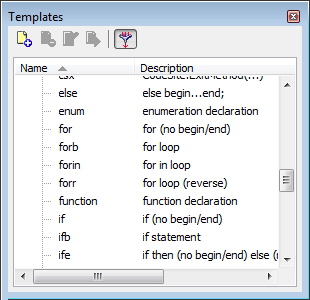
You can also invoke live templates from the Templates pane, shown in the following figure. To display the Templates pane, select View | Templates from Delphi's main menu.
Each of the standard templates that ship with Delphi are defined by an XML file. You can edit this XML if you want to change the template's content or behavior. To edit one of the standard templates, select the template in the Template pane and then click Edit from the Template pane's toolbar. The following figure shows the case live template in the code editor.

The case live template is a good example to learn from, since it includes point, hint, text, description, author, and script elements. Furthermore, this is a surround template, which means that a code segment that you select before executing this template will result in the selected block of code being enclosed in the try block.
The template element can contain four attributes. The name attribute is required, and must define a unique name for the template for the specified language.
The remaining attributes are optional. Use surround="true" to define a surround template, one that can surround a block of code. Use invoke= to define the type of invocation for the template. Valid values for invoke are "auto," "manual," and "none" (the default).
Set invoke to auto or manual to insert the template by typing its name and pressing a key. For auto templates you can press Space or Tab, and for manual templates you can press Tab. With any invocation type, you can type the name of the template and insert it using Ctrl-J, or you can press Ctrl-Spacebar and select the template from the displayed list.
The final attribute, inplace="true", defines an expansion template. It is unclear what an expansion template is, since it does not appear to be used.
The point, description, and author elements are child elements of template, and they are optional. When one or more point elements are used, they define custom sync points in your template code. Each sync point can include a text element, defining the default value, and a hint element, which sets a hint for the point.
A point, as well as the code element, can also define a script attribute, which references an active script. Active scripts are described later in this post.
The description element provides the description of the template that appears in the popup menus and the Templates dialog box. The author element identifies the template's author.
The final element, the code element, describes the code that the template inserts. This element has several attributes, as well as a CDATA section. For a Delphi template, set the language attribute to Delphi. Also, define the delimiter that identifies the custom and predefined sync points. Since the $ character, which is the default delimiter, has special meaning in Delphi, most developers define the | character (the vertical bar) as the delimiter.
The code itself appears in the CDATA section, between the [ and the ]]> characters. This code can include literal characters, hard returns, and sync points, both custom and predefined. In the code segment shown in the case live template, the |expression| and |cases| strings represent the position of the corresponding sync points in the live template. You can see these points defined earlier in the template definition.
In addition to your custom sync points, there are three predefined points. These are |surround|, |*|, and |end|. If your code template is a surround template, you include the |surround| point to identify where the selected block will appear, relative to the rest of the template. When |*| appears in your template, it specifies that what following on that line should be indented by the block indent amount defined on you Options dialog box. You can include as many |*| predefined points in your live template as you need.
Finally, the |end| predefined point identifies where your cursor will appear after the live template has been inserted. Like the |surround| point, there can be only one |end| point in your live template.
To create a custom live template, click New from the Templates pane's toolbar. Alternatively, you can select the Template Wizard from the Object Repository. To do this, select File | New | Other from Delphi's main menu. Then, select the Template Wizard from the Other Files node of the Object Repository and select Ok.
The new template appears as an XML document in the code editor, as shown in the following figure. As you inspect this figure, you will notice that the new template is displaying a hint. This is because the new custom live template is created by a live template. Not only does this reveal the incredible power of live templates, but the hints that are provide greatly simplify the process of creating your own new, live template.
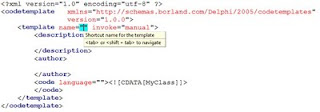
To complete your custom live template, fill in the various variable parts of the template, and add your own elements, as needed, to define the features you want in your template.
In addition to the hints that the Live Template template provides you with, you should also examine the standard live templates that ship with Delphi for insight and tips about writing your own, first-rate custom live templates.
For example, imagine that you want to enclose the following code selection in a try ... except block in a Delphi project.
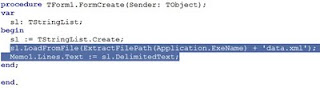
With the desired code selected, select the tryf live template from the Templates pane, and then click Execute. Alternatively, select the block of code to surround, right-click in the editor, select Surround from the displayed context menu, and then select tryf.

Notice also that the code block that you selected has been indented as well, making the resulting code more readable. You are now ready to insert a call to the Free method of the TStringList in the finally block, ensuring its destruction once you are through with it.
If you create your own custom surround templates, those will automatically appear in the Surround context menu. Specifically, the Surround context menu includes any custom live templates that you've created for the current language personality where the surround attribute is set to true in the element.
While it is a more involved process, similar to that of creating a keyboard macro, you can also write your own active scripts to be called from your live templates. You do this by creating a design time package. Within this design time package you create a class that descends from TInterfacedObject and implements IOTACodeTemplateScriptEngine. The unit in which this class is implemented should use the ToolsAPI and CodeTemplateAPI units.
From within this new class, implement the GetIDString, GetLanguage, and Execute methods. Use GetIDString to return a unique string, one that will not be used by any other active script. As a convention, this string typically uses dot notation, and includes your company's name or acronym followed a dot and the active script name. No spaces can appear in this string.
You use GetLanguage to return the name of the language that will be used to identify your scripting class. This string is used in a script element, which instructs the editor to use your scripting class.
Finally, you implement the Execute method. This method is passed five parameters, some of which may be nil for a particular active script. The first parameter is an object that implements the IOTACodeTemplate interface. This object provides you with access to the text associated with the script element that is calling your script.
The second parameter is an object that implements an IOTACodeTemplatePoint. This object represents the current sync point triggering an onenter or onexit script. For onvalidate scripts, this object is nil.
The third parameter is an object that implements IOTASyncEditPoints. Use this object to examine all sync points in the live template. Again, this object is nil for onvalidate scripts, since the template does not actually exist yet.
The fourth parameter is an object that implements IOTACodeTemplateScript. This object provides you access to the CDATA section of the code element.
The final parameter is a Boolean parameter. You use this from an onvalidate script to signal that the template has been processed successfully.
From within your active script, your execute method examines sync points and the code template to determine what actions to take. Furthermore, since the ToolsAPI unit is in your uses clause, you can use the BorlandIDEServices object to gain access to the Editor ToolsAPI, which permits you to read, add, delete, and change text within the editor.
A Russian translation of this post can be found in Aleksey Timohin's Delphi blog: http://www.tdelphiblog.com/2011/07/live-templates-revisited.html. Aleksey is the author of Lazy Delphi Builder - free build tool for Delphi with automatic dependency resolving.
Русский перевод этой записи доступен в Delphi блоге Алексея Тимохина по адресу: http://www.tdelphiblog.com/2011/07/live-templates-revisited.html. Алексей также является автором бесплатного инструмента для сборки Delphi-программ: Lazy Delphi Builder.
Consider the inserted template shown in the following figure. This template was created by executing the forb template, which inserts a for loop with a begin..end block.

You will also notice that the I, as well as the 0 and List.Count appear as bordered text. These bordered text areas represent the sync points of the live template. After changing I to i, press Tab or Shift-Tab to navigate between the sync points of the template. As you navigate, you will notice that the hints change to describe the role of the currently selected point.
The following figure shows the same live template shown in the preceding figure after you have navigated to the third variable part.

Many live templates, such as the forb template, also support intelligent code insertion, or active scripting. With active scripting, code executes when you insert or interact with the template, conditionally performing one or more tasks for you. In the case of the forb template, if the function in which you insert this template does not already contain a declaration for the loop iterator variable, one will be inserted for you once you press the Tab key after completing all sync points. The following code segment depicts how a previously empty method might look after the execution of the active script associated with the forb live template.

Invoking Live Templates
Delphi provides you with a large number of standard live templates for each of its language personalities (Delphi, C++, XML, and so forth). These templates can be invoked either on demand or automatically, depending on how the live template is defined as well as how the Delphi environment is configured.Regardless of a live template's definition, you can invoke a live template on demand by positioning your cursor within the editor where you want to place the live template and press Ctrl-J. Delphi responds by displaying the Insert Template menu, shown in the following figure. Select the template you want to insert from this menu and press Enter.

Similarly, you can begin typing the first few characters of the template shortcut name before pressing Ctrl-J. If only one template's shortcut name matches the characters you've typed, that template is selected and inserted, without the Insert Template menu being displayed. If two or more template shortcut names match what you've typed, the Insert Template menu appears, though only the matching template names are shown, in which case you then select which of the displayed templates you want and press Enter.
Automatic invocation is available when a live template and Delphi are both configured for it. For those live templates that include the invoke="auto" attribute in the template element of the template definition, auto completion is available when the Code templates completion and Auto complete checkboxes are checked on the Code Insight table of the Options dialog box. You display this dialog box by select Tools
Options from Delphi's main menu.

With automatic live template invocation, live templates are inserted when you type the name of a template shortcut and press Tab, Spacebar, or Ctrl-J. For example, if you type forb and press Tab with code templates completion enabled, the forb live template is instantly inserted into your code at the position of your cursor.
Live templates also show up in the code completion menu, which you can invoke by pressing Ctrl-Spacebar. Templates always appear at the end of this list.
You can also invoke live templates from the Templates pane, shown in the following figure. To display the Templates pane, select View | Templates from Delphi's main menu.
Each of the standard templates that ship with Delphi are defined by an XML file. You can edit this XML if you want to change the template's content or behavior. To edit one of the standard templates, select the template in the Template pane and then click Edit from the Template pane's toolbar. The following figure shows the case live template in the code editor.

The case live template is a good example to learn from, since it includes point, hint, text, description, author, and script elements. Furthermore, this is a surround template, which means that a code segment that you select before executing this template will result in the selected block of code being enclosed in the try block.
The Parts of a Live Template
The root element of a live template is the codetemplate element. The codetemplate element two attributes, xmlns and version, which define an XML namespace and a version, respectively. The codetemplate element has a single child element, named template.The template element can contain four attributes. The name attribute is required, and must define a unique name for the template for the specified language.
The remaining attributes are optional. Use surround="true" to define a surround template, one that can surround a block of code. Use invoke= to define the type of invocation for the template. Valid values for invoke are "auto," "manual," and "none" (the default).
Set invoke to auto or manual to insert the template by typing its name and pressing a key. For auto templates you can press Space or Tab, and for manual templates you can press Tab. With any invocation type, you can type the name of the template and insert it using Ctrl-J, or you can press Ctrl-Spacebar and select the template from the displayed list.
The final attribute, inplace="true", defines an expansion template. It is unclear what an expansion template is, since it does not appear to be used.
The point, description, and author elements are child elements of template, and they are optional. When one or more point elements are used, they define custom sync points in your template code. Each sync point can include a text element, defining the default value, and a hint element, which sets a hint for the point.
A point, as well as the code element, can also define a script attribute, which references an active script. Active scripts are described later in this post.
The description element provides the description of the template that appears in the popup menus and the Templates dialog box. The author element identifies the template's author.
The final element, the code element, describes the code that the template inserts. This element has several attributes, as well as a CDATA section. For a Delphi template, set the language attribute to Delphi. Also, define the delimiter that identifies the custom and predefined sync points. Since the $ character, which is the default delimiter, has special meaning in Delphi, most developers define the | character (the vertical bar) as the delimiter.
The code itself appears in the CDATA section, between the [ and the ]]> characters. This code can include literal characters, hard returns, and sync points, both custom and predefined. In the code segment shown in the case live template, the |expression| and |cases| strings represent the position of the corresponding sync points in the live template. You can see these points defined earlier in the template definition.
In addition to your custom sync points, there are three predefined points. These are |surround|, |*|, and |end|. If your code template is a surround template, you include the |surround| point to identify where the selected block will appear, relative to the rest of the template. When |*| appears in your template, it specifies that what following on that line should be indented by the block indent amount defined on you Options dialog box. You can include as many |*| predefined points in your live template as you need.
Finally, the |end| predefined point identifies where your cursor will appear after the live template has been inserted. Like the |surround| point, there can be only one |end| point in your live template.
Custom Live Templates
While the standard live templates that ship with Delphi are extremely useful, you will be delighted to discover that you can create your own, custom live templates.To create a custom live template, click New from the Templates pane's toolbar. Alternatively, you can select the Template Wizard from the Object Repository. To do this, select File | New | Other from Delphi's main menu. Then, select the Template Wizard from the Other Files node of the Object Repository and select Ok.
The new template appears as an XML document in the code editor, as shown in the following figure. As you inspect this figure, you will notice that the new template is displaying a hint. This is because the new custom live template is created by a live template. Not only does this reveal the incredible power of live templates, but the hints that are provide greatly simplify the process of creating your own new, live template.

To complete your custom live template, fill in the various variable parts of the template, and add your own elements, as needed, to define the features you want in your template.
In addition to the hints that the Live Template template provides you with, you should also examine the standard live templates that ship with Delphi for insight and tips about writing your own, first-rate custom live templates.
Surround Templates
Surround templates are a special subset of live templates that permit you to quickly enclose, or surround, a selected block of code. Examples of surround templates include forb, try, procedure, and comment live templates.For example, imagine that you want to enclose the following code selection in a try ... except block in a Delphi project.

With the desired code selected, select the tryf live template from the Templates pane, and then click Execute. Alternatively, select the block of code to surround, right-click in the editor, select Surround from the displayed context menu, and then select tryf.

Notice also that the code block that you selected has been indented as well, making the resulting code more readable. You are now ready to insert a call to the Free method of the TStringList in the finally block, ensuring its destruction once you are through with it.
If you create your own custom surround templates, those will automatically appear in the Surround context menu. Specifically, the Surround context menu includes any custom live templates that you've created for the current language personality where the surround attribute is set to true in the element.
Active Scripts
Active scripts are compiled Delphi classes that can react to events triggered during your interaction with a live template. Many of Delphi's templates use active scripts, including the case live template shown earlier , which invokes the PopulateCase active script. PopulateCase is one of about six active scripts that are shipped with Delphi. Sadly, their source code is not available.While it is a more involved process, similar to that of creating a keyboard macro, you can also write your own active scripts to be called from your live templates. You do this by creating a design time package. Within this design time package you create a class that descends from TInterfacedObject and implements IOTACodeTemplateScriptEngine. The unit in which this class is implemented should use the ToolsAPI and CodeTemplateAPI units.
From within this new class, implement the GetIDString, GetLanguage, and Execute methods. Use GetIDString to return a unique string, one that will not be used by any other active script. As a convention, this string typically uses dot notation, and includes your company's name or acronym followed a dot and the active script name. No spaces can appear in this string.
You use GetLanguage to return the name of the language that will be used to identify your scripting class. This string is used in a script element, which instructs the editor to use your scripting class.
Finally, you implement the Execute method. This method is passed five parameters, some of which may be nil for a particular active script. The first parameter is an object that implements the IOTACodeTemplate interface. This object provides you with access to the text associated with the script element that is calling your script.
The second parameter is an object that implements an IOTACodeTemplatePoint. This object represents the current sync point triggering an onenter or onexit script. For onvalidate scripts, this object is nil.
The third parameter is an object that implements IOTASyncEditPoints. Use this object to examine all sync points in the live template. Again, this object is nil for onvalidate scripts, since the template does not actually exist yet.
The fourth parameter is an object that implements IOTACodeTemplateScript. This object provides you access to the CDATA section of the code element.
The final parameter is a Boolean parameter. You use this from an onvalidate script to signal that the template has been processed successfully.
From within your active script, your execute method examines sync points and the code template to determine what actions to take. Furthermore, since the ToolsAPI unit is in your uses clause, you can use the BorlandIDEServices object to gain access to the Editor ToolsAPI, which permits you to read, add, delete, and change text within the editor.
Summary
Live templates are one of those lesser used treasures in Delphi. While less approachable than their code template cousins from early versions of Delphi, they are much more powerful, and it is worth your while to take another look at them.A Russian translation of this post can be found in Aleksey Timohin's Delphi blog: http://www.tdelphiblog.com/2011/07/live-templates-revisited.html. Aleksey is the author of Lazy Delphi Builder - free build tool for Delphi with automatic dependency resolving.
Русский перевод этой записи доступен в Delphi блоге Алексея Тимохина по адресу: http://www.tdelphiblog.com/2011/07/live-templates-revisited.html. Алексей также является автором бесплатного инструмента для сборки Delphi-программ: Lazy Delphi Builder.
Tuesday, March 29, 2011
Delphi in Depth: ClientDataSets
I'm pleased to announce that my latest book, Delphi in Depth: ClientDataSets, is now available for purchase. The following is the introduction from this book. At the end of this post you will find a link to the book site. That site includes links for ordering the book from several different outlets, and also includes a special offer for US residents.

Before there was the ClientDataSet, Delphi's Borland Database Engine supported cached updates. When cached updates were enabled, changes to your database tables and editable queries were not written to the underlying database on a record-by-record basis. Instead, updates were delayed, permitting a group of changes to be applied to the underlying database in an all-or-none fashion (or even discarded altogether).
I wrote extensively about cached updates in the early days of Delphi, but over time cached updates lost their appeal. There were two reasons for this. First, the Borland Database Engine became dated, and it's SQL counterpart, the Borland SQL Links for Windows, was deprecated. The second is that cached updates became hopelessly broke, and this happened sometime around the release of Delphi 6.
Fortunately, there was a ready replacement — ClientDataSets. ClientDataSets supported all of the basic features of cached updates and much more. In addition to providing a mechanism for grouping updates, ClientDataSets also introduced in-memory management of data and indexes, the ability to persist data and restore it to its previous state, an intuitive interface for managing the cache, and a convenient mechanism for transferring a ClientDataSet's state between processes.
Originally ClientDataSets were only in the high-end versions of Delphi. Specifically, the Client/Server edition. Furthermore, the license to use a ClientDataSet in a distributed application was separate from Delphi, and was originally very expensive.
With the release of Kylix and subsequently Delphi 6 the ClientDataSet became available in the Professional version of Delphi, and the MIDAS (Multitier Distributed Application Services) license become affordable, and later was included with the product. (The technology that was MIDAS is now called DataSnap.)
With ClientDataSets now within reach of all Delphi developers, I became an enthusiastic advocate for their use. Not only did I speak extensively about the virtues of ClientDataSets at developer conferences, I also published an extended series of articles on the Borland Developer Network detailing the use and capabilities of ClientDataSets.
At a recent Delphi conference at which I was presenting a talk on advanced ClientDataSet features, I had a revealing discussion with an attendee. His questions about an issue he was having with ClientDataSets demonstrated a fundamental misunderstanding about how they worked.
When I explained what was happening, he expressed frustration that this information was not more readily available. I directed him to my previous articles and commented, in passing, that maybe I should write a book about ClientDataSets. "I'll be the first one in line to buy it if you write that book" was his reply.
This idea has been with me for some time, and this past winter I finally pulled myself together and started on this book in earnest.
Initially I thought that I could write this book by starting with some of my previous writings, including both the published series as well as a two-day Delphi course that I wrote and train called Mastering ClientDataSets. The trick, I reasoned, would be in the organization, and I had a lot of ideas about how I would go about this.
Projects like these tend to take on a life of their own, and once I was happy with the book's outline, I realized that I was committed to writing new material, a lot of new material. In the end, I estimate that at least 80 percent of this book is completely original, and that material that I salvaged from my previous writings often received extensive revision.
I am really happy about how this book turned out. I hope that you are too.
Next you learn how to define the structure of a ClientDataSet, a process that can be undertaken both at design time as well as at runtime. The relative roles of FieldDefs and Fields are discussed, and the roles of persistent versus dynamic Fields are considered. How virtual Fields differ from data Fields is also explained.
Chapter 5 introduces indexes, including the difference between persistent and temporary indexes. The relationship between a ClientDataSet's indexes and those of an underlying database is also discussed.
In chapter 6 we take a long look at the change cache, the mechanism responsible for caching updates. Here you learn how to enable and disable the cache, how to detect changes to it, and how to modify the contents of the cache.
Chapters 7 through 9 introduce topics that will be familiar to many Delphi database developers, including how to edit, navigate, search, and filter data. These discussions, however, demonstrate the flexibility that ClientDataSets bring to these features, providing you with capabilities not available in other DataSets.
Chapters 10, 11, and 12 introduce some of the more interesting features found only in ClientDataSets. These features include aggregates, cloned cursors, and nested datasets.
The final three chapters of this book take a close look at DataSnap. These chapters specifically look at DataSnap applications where ClientDataSets in a client application interact with DataSetProviders running in a DataSnap server. Here you will learn to create DataSnap servers and clients using both the classic COM-based DataSnap as well as the new IP-based DataSnap first introduced in Delphi 2009.
Introduction from Delphi in Depth: ClientDataSets
Before there was the ClientDataSet, Delphi's Borland Database Engine supported cached updates. When cached updates were enabled, changes to your database tables and editable queries were not written to the underlying database on a record-by-record basis. Instead, updates were delayed, permitting a group of changes to be applied to the underlying database in an all-or-none fashion (or even discarded altogether).
I wrote extensively about cached updates in the early days of Delphi, but over time cached updates lost their appeal. There were two reasons for this. First, the Borland Database Engine became dated, and it's SQL counterpart, the Borland SQL Links for Windows, was deprecated. The second is that cached updates became hopelessly broke, and this happened sometime around the release of Delphi 6.
Fortunately, there was a ready replacement — ClientDataSets. ClientDataSets supported all of the basic features of cached updates and much more. In addition to providing a mechanism for grouping updates, ClientDataSets also introduced in-memory management of data and indexes, the ability to persist data and restore it to its previous state, an intuitive interface for managing the cache, and a convenient mechanism for transferring a ClientDataSet's state between processes.
Originally ClientDataSets were only in the high-end versions of Delphi. Specifically, the Client/Server edition. Furthermore, the license to use a ClientDataSet in a distributed application was separate from Delphi, and was originally very expensive.
With the release of Kylix and subsequently Delphi 6 the ClientDataSet became available in the Professional version of Delphi, and the MIDAS (Multitier Distributed Application Services) license become affordable, and later was included with the product. (The technology that was MIDAS is now called DataSnap.)
With ClientDataSets now within reach of all Delphi developers, I became an enthusiastic advocate for their use. Not only did I speak extensively about the virtues of ClientDataSets at developer conferences, I also published an extended series of articles on the Borland Developer Network detailing the use and capabilities of ClientDataSets.
At a recent Delphi conference at which I was presenting a talk on advanced ClientDataSet features, I had a revealing discussion with an attendee. His questions about an issue he was having with ClientDataSets demonstrated a fundamental misunderstanding about how they worked.
When I explained what was happening, he expressed frustration that this information was not more readily available. I directed him to my previous articles and commented, in passing, that maybe I should write a book about ClientDataSets. "I'll be the first one in line to buy it if you write that book" was his reply.
This idea has been with me for some time, and this past winter I finally pulled myself together and started on this book in earnest.
Initially I thought that I could write this book by starting with some of my previous writings, including both the published series as well as a two-day Delphi course that I wrote and train called Mastering ClientDataSets. The trick, I reasoned, would be in the organization, and I had a lot of ideas about how I would go about this.
Projects like these tend to take on a life of their own, and once I was happy with the book's outline, I realized that I was committed to writing new material, a lot of new material. In the end, I estimate that at least 80 percent of this book is completely original, and that material that I salvaged from my previous writings often received extensive revision.
I am really happy about how this book turned out. I hope that you are too.
About this Book
This book takes an in-depth look at ClientDataSets. It begins with an overview of what a ClientDataSet is, and describes some of the ways that they can be used in your Delphi applications. It continues with a close examination of one of the more common uses for a ClientDataSet, reading and writing data from an underlying database through its interaction with a DataSetProvider.Next you learn how to define the structure of a ClientDataSet, a process that can be undertaken both at design time as well as at runtime. The relative roles of FieldDefs and Fields are discussed, and the roles of persistent versus dynamic Fields are considered. How virtual Fields differ from data Fields is also explained.
Chapter 5 introduces indexes, including the difference between persistent and temporary indexes. The relationship between a ClientDataSet's indexes and those of an underlying database is also discussed.
In chapter 6 we take a long look at the change cache, the mechanism responsible for caching updates. Here you learn how to enable and disable the cache, how to detect changes to it, and how to modify the contents of the cache.
Chapters 7 through 9 introduce topics that will be familiar to many Delphi database developers, including how to edit, navigate, search, and filter data. These discussions, however, demonstrate the flexibility that ClientDataSets bring to these features, providing you with capabilities not available in other DataSets.
Chapters 10, 11, and 12 introduce some of the more interesting features found only in ClientDataSets. These features include aggregates, cloned cursors, and nested datasets.
The final three chapters of this book take a close look at DataSnap. These chapters specifically look at DataSnap applications where ClientDataSets in a client application interact with DataSetProviders running in a DataSnap server. Here you will learn to create DataSnap servers and clients using both the classic COM-based DataSnap as well as the new IP-based DataSnap first introduced in Delphi 2009.
For More Information
For more information about the book, including links for purchasing this book, please go to http://www.JensenDataSystems.com/cdsbook. This site also includes a special discount offer for US residents.Monday, February 28, 2011
Advantage Replication, Triggers, and Notifications
Most of my posts here are associated with Delphi, but I am also a big fan of the Advantage Database Server, an ISAM (indexed sequential access method) remote database server marketed by Sybase, an SAP company. As I write this I am on a plane returning from an extended onsite visit to one of my clients. During this visit we implemented a number of interesting features in their database application that made extensive use of three of Advantage’s more sophisticated features – replication, triggers, and notifications.
This is not the first time that I’ve used these Advantage features. At the same time, I haven’t written a whole lot about the real world application of these capabilities, and this seems like a good time to share, particularly because I feel a genuine excitement about how nicely these facilities came together to form a meaningful and maintainable solution to a complex problem.
I’ll begin by describing the basic problem that we were faced with, after which I’ll describe how Advantage replication, triggers, and notifications provided a convenient and minimally invasive solution. And for the record, the development environments employed are a mixture of Delphi (native and .NET), C#, SQL, JavaScript/jQuery, Web services, console applications, and Windows services, which is pretty typical of an enterprise-level application.
This particular client operates a number of business interests that interact with each other, and they develop a lot of custom software to support the business processes that distinguish them from their competitors. To say that they are technologically savvy is an understatement.
On my recent visit they determined that they needed to be able to extend communication between two separate database applications that were built independently for very different purposes. Specifically, they needed to make data managed by one application available to another, more or less in real time. That data, in turn, needed to be used to send text messages to specific users of the second database about specific changes occurring in the data on the first database.
These database applications were developed by different teams, and are running on completely different servers. The first application is a native client/server application, and the second is a browser-based application. In addition, the first application is employing Advantage 9.1, the previous version of Advantage, while the second is using the latest version, which is Advantage 10.1. To make things more difficult, this new capability needs to be implemented with no modification to the source application on the first database, if at all possible.
The solution to sharing the data without modifying the source application was to use Advantage's replication feature. Replication, which requires a special replication license on each replicating database, permitted us to transfer changes made to several of the database tables of interest between the two databases. When a table is being replicated, records that are inserted into that table on the source database are also inserted into a corresponding table on the destination database. Similarly, a record that is inserted or update on the source database causes that same change to be performed on the corresponding record in the destination database.
Our solution involved replication of two tables, which I will call events and notifications. The events table represents upcoming events and the current status of that event (schedule, in-process, or complete). This table is a key table of the first application, and represents potential events of interest to users of the second application. The events table is replicated using one-way replication, in that the second database will never make changes to the upcoming events. In other words, even if a user on the second database were to make a change to the events table (which we do not permit), that change would not be sent back to the first database.
The notifications table identifies those events that are of interest to users of the second application, and this table is replicated bi-directionally. Bi-directional replication permits users of the second database to create and remove events about which they want to be notified, as well as to permit the first database to update the notifications table once a notification has been performed. (How this is achieve is discussed later in this post). Through bi-directional notification, both databases can edit the notifications table and see changes made by the other database.
We also leveraged a feature of replication introduced in Advantage 9; the ability to replicate some, but not all of the fields of a source table. The events table contains a lot of fields that are not of interest to users who need notification. Therefore we replicated only the selected fields of interest from the first database to the second. As a result, the inter-database communication used only the bandwidth necessary to transfer the data we needed.
One of the nice characteristics of Advantage replication is that the source database queues replications if a connection to the destination database is lost. So, for example, if we need to reboot the server on which the destination database is running, the source database will hold those changes that need to be replicated until the destination database comes back online. As a result, data is never lost, though sometimes it will be delayed a little, but that is better than losing the data altogether.
Since we were trying to implement these features with no changes to the source application, our solution to managing the notifications employed two additional Advantage features: Triggers and notifications.
Advantage triggers are typically SQL statements that are executed by Advantage in response to record-level events on a table, such as record insertions, deletions, and updates. In this case, we placed a trigger on the events table on the source database. Each time the events table is changed, this trigger determines if the event is associated with an active notification in the notifications table. If so, it calls a stored procedure that inserts a records into a special table used for scheduling messages. It also then sets the timestamp field in the notifications table for that notification, making that particular notification inactive (no more notifications will be sent about that particular event).
And here is where Advantage notifications made their presence felt. Actually, we had been meaning to implement a generic email/texting solution in this database for some time, and we used this opportunity to do just that. Here is how we did it. The messages table, which is located in the source database, includes fields for a subject line, a message body, an attachment, as well as additional fields that could hold one or more email addresses to which the email or text message should be sent. (A future update will include a child table where zero, one, or more attachments can be defined, but we'll save that one for later.)
The messages table also includes a timestamp field that is populated when the emails and text messages are sent, and this field is used to distinguish between messages sent and those still pending. This table also includes an after insert trigger that generates a notification when a record is inserted.
Due to the way that the messages table and its trigger are designed, any application (console, standalone, Web-based, or mobile) can send an message simply by inserting a record into the messages table. We simplified things a bit further by creating an easy to use stored procedure that performs the insertion into messages, along with some additional validation and error handling.
Advantage notifications are created by calling a system stored procedure named sp_SignalEvent. Any application that wants to be notified about a particular notification calls the sp_CreateEvent system stored procedure, after which it can call the sp_WaitForEvent or sp_WaitForAnyEvent system stored procedure to be blocked until a notification of interest is received. As you might imagine, a call to sp_WaitForEvent or sp_WaitForAnyEvent should typically be called from a worker thread, and that's just what we did.
We built a separate Windows service using Delphi to generate the emails and text messages. Each time the Windows service starts, it spawns a thread that begins by calling sp_CreateEvent for two different Advantage notifications. One of these is the notification generated by the after insert trigger on the messages table. The second is a notification generated by a stored procedure that the Windows service itself executes when it receives an instruction to shut down. This notification is used to wake up the worker thread when the Windows service is being terminated.
Next, the worker thread queries the messages table, looking for records where the sent timestamp field is null. If one or more unsent messages are found, the thread generates the necessary emails and text messages for each message, using Delphi's Internet Direct (Indy) TIdSMTP component, after which it sets the messages timestamp field to the time the message was sent.
After sending any pending emails, the Windows service calls sp_WaitForAnyEvent, which blocks the thread until it is receives one of the two notifications of interested.
When the thread in the Windows service receives one of the notifications, it first checks to see if it has been terminated (the Windows service is shutting down). If not, it processes any unsent messages from the messages table, after which it calls sp_WaitForAnyEvent again. This process repeats as long as the Windows service continues to run.
Importantly, all emails are sent, even if the Windows service needs to be shutdown now and then, similar to how replication restarts if a connection to the destination database is temporarily lost.
This set of solutions provided us with the seamless complement of features that we needed, with minimal complexity and modest modifications to the databases. It also permitted us to implement a messaging system that can be used to send emails or text messages by any applications that can talk to the database. Yes, these features could have been implemented in a number of different ways, but this set of solutions provided us with a minimally invasive modification to our databases while providing a reliable and maintainable answer to our needs.
In closing, I've got one more bit of good news. As many of you know, Loy Anderson and I have written three books (to date) about the Advantage Database Server. Our latest book, Advantage Database Server: A Developer's Guide, 2nd Edition, is available on Amazon, CreateSpace (Amazon's publishing company), and Fastspring. This book includes chapters on replication, triggers, stored procedures, SQL, and notifications. See http://www.jensendatasystems.com/ADSBook10 for details. More importantly, it recently became available on Amazon's European and Japanese sites.
Amazon is weird this way, and I hope they change (since we are just finishing our next book on Delphi ClientDataSets, which we will be publishing on Amazon this spring). Our Advantage book has been available on Amazon in the US since late August, but only became available in Europe, the UK, and Japan in the past month. Heck, we're happy that the book is now being sold at the various Amazons, but are still a little annoyed at the delay between its initial publication and its wider availability.
Monday, January 10, 2011
Delphi Developer Days 2011
With his blog on December 16, Marco Cantù officially announced our 2011 Delphi Developer Days tour, Delphi Developer Days 2011 with Marco Cantù and Cary Jensen. Over the past few days we have posted our full agenda and session descriptions online, and this seems like an ideal time to talk about Delphi Developer Days in some detail.
Delphi Developer Days is an intense, two-day Delphi event that is like a cross between a small, intimate conference and a rigorous training seminar, and this year we will be visiting four cities in North America and Europe in April and May. Each event consists of 18 different presentations, some of which are presented jointly by Marco and me, and others are breakout sessions, where we present different sessions simultaneously in separate rooms.
For the joint presentations, we have chosen topics that we feel are of interest to all Delphi developers, such as the future of Delphi and preparing for 64-bit computing with Delphi. We also include several open question and answer sessions, where all Delphi topics are considered.
With respect to the breakout sessions, a lot of thought went into which sessions we should offer, and which sessions to present against one and other. For example, we included a collection of topics that cover earlier versions of Delphi, as well as sessions that explore some of Delphi's latest features. In addition, when one session is covering Internet/multi-tier/network topics, the other is not. A breakout covering some of Delphi’s most current features is balanced with a talk that applies to many versions of Delphi. It was a balancing act, but we think we did pretty well.
Furthermore, we have included a wide range of topics, including DataSnap, VCL component development, recent Delphi language enhancements, REST and jQuery, and debugging, just to name of few. And since we know that a number of our attendees from previous Delphi Developer Days seminars will be attending, we have included a lot of new topics. In fact, this years topics only include one session that is a repeat from last year. This talk is Marco's talk on VCL (visual component library) component development. I presented this topic last year, so even if you were in my session, you might be interested in Marco's perspective.
We are very happy with the agenda, and actually hope that you have difficulty choosing which of the breakout sessions to attend. But you will still not miss a thing, since the course book that you will receive when you attend Delphi Developer Days includes detailed coverage of every breakout session (and joint sessions as well). And I am not talking about just any course book. In addition to being Delphi trainers, developers, and conference speakers, Marco and I are both book authors.
Marco is the best-selling author of more than a dozen Delphi books, beginning with Mastering Delphi (Sybex, 1995), and continuing with his popular Delphi Handbook series. He is currently working on his next publication, Delphi XE Handbook.
I, too, am an author, having published more than 20 books. My next book, covering Delphi's ClientDataSet, will be available this spring. But the point is, we like to write as well as code, and when it comes to Delphi Developer Days, we take the time to write down our presentations so that you have something to take home with you after the event (letting you concentrate on our presentations rather than taking notes). In fact, the sessions in our course book contain more information than we can cover in our live presentations, but that’s all the better for you.
For the past two years, the Delphi Developer Days course book has been about 500 pages in length, making it longer than most Delphi books. We don't know the final page count yet, but this year's course book will be similar. And, no, you cannot buy the course book separately (sorry). Only attendees of Delphi Developer Days 2011 receive it.
Seating availability for Delphi Developer Days is limited, and this decision was intentional. Specifically, each city is limited to no more than about 34 attendees (we'll add cities, if necessary, but we won't increase the attendance). By doing this, we ensure two things. First, by keeping the total attendance reasonable we ensure that everyone gets an opportunity to speak with us, as well as each other. However, we don't want it too small. This size seems a perfect number for encouraging interaction, sharing different viewpoints, and supporting stimulating interaction.
Another aspect of Delphi Developer Days that is the result of much thought is the locations we selected. In short, we specifically choose hotels located near large airports and/or train stations. Our Washington DC/Baltimore location is close to the BWI (Baltimore/Washington International) airport, and there is a free hotel shuttle from the airport. (The hotel is about three miles away.) From New York, Philadelphia, Washington DC, and other cities, you can take the Amtrak train to BWI (there is a free shuttle between the Amtrak station and BWI).
In Houston, the hotel is right next to Houston Intercontinental Airport (IAH), one of the largest airport hubs in the US, and this hotel also has a free airport shuttle. Our Frankfurt location is a short 2 kilometer city bus trip or taxi from the Frankfurt Hauptbahnhof (the Frankfurt main train station), which itself is a short and inexpensive train ride from Frankfurt Airport. Or, it’s a 20-minute taxi ride from Frankfurt Airport (FRA).
In Amsterdam, our final city, it's even better. Delphi Developer Days 2011 Amsterdam is in the historic Park Plaza Victoria Hotel Amsterdam, which is across the street from Amsterdam Central Station (there are trains between Amsterdam Central Station and Schiphol Airport (AMS) four times an hour, the trip takes less than 20 minutes, and the cost is less than 4 Euros)
Our attendees come from all over the world, and we’ve tried to make this as simple as possible. So, no matter where you are coming from, you will have an easy time getting to Delphi Developer Days events.
Attendees to Delphi Developer Days receive the Delphi Developer Days course book, the source code shown in our sessions, and lunch on both days. You also get a chance to win products donated by our many sponsors. Last year there were more than 20 official sponsors of Delphi Developer Days, including our platinum sponsors, Embarcadero Technologies and Sybase (an SAP company). We expect this year to be similar, and attendees have a good chance of winning something.
I want to share with you another aspect about Delphi Developer Days, but it is more of an intangible. Marco and I are good friends, and really enjoy being able to offer an event like Delphi Developer Days to you. We share an enthusiasm for Delphi, professional software development, and learning. As previous attendees to Delphi Developer Days can attest, it’s fun. Sure, we cover a lot of information, but that’s all part of the fun.
We are currently offering an early-bird discount for Delphi Developer Days 2011. Attendees who register and make payment by March 5 for the US cities, and those who register and make payment by April 5 for the European cities, will receive a 10% discount. We also offer an additional discount for 3 or more attendees from the same company (same physical address), as well as an additional 10% discount if you previously attended a Delphi Developer Days event in 2009 or 2010.
We are excited about the Delphi Developer Days 2011 tour, and hope you are, too. It’s going to be the “Delphi Event of the Year.” Here are more details:
April 11-12, 2011: Washington DC/Baltimore, Maryland (Holiday Inn Express Hotel & Suites, BWI Airport West)
April 14-15, 2011: Houston, Texas (Clarion Inn at Bush Intercontinental Airport)
May 12-13, 2011: Frankfurt (main), Germany (Holiday Inn Express Frankfurt-Messe)
May 16-17, 2011: Amsterdam, The Netherlands (Park Plaza Victoria Hotel Amsterdam)
Visit http://www.delphideveloperdays.com/ for more information.
Monday, November 29, 2010
Hey! Debugger. Leave My Exception Alone!
(with appologies to Roger Waters) 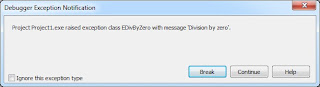
In a recent post (Breakpoints with Side Effects) I wrote about breakpoints with side effects. One of the side effects that I mentioned was the ability to ignore all subsequent exceptions, as well as restore the normal response of the debugger to encountered exceptions (pause the execution of your code).
In response, a reader posted a comment asking how to instruct the debugger to ignore exceptions, particularly those that cannot be anticipated. He wrote "when debugging unit-tests that have to trigger exceptions ... I'm not interested in the expected exceptions, I'm interested in the unexpected ones! Having the debugger break on them all, can be quite inconvenient."
Fortunately, Delphi and its debugger provide you with a number of mechanisms for ignoring exceptions. These techniques can be divided into two general categories. The first is to disable breaking on exceptions, even though the debugger is active. The second is to run your code without activating the debugger (but with the option to active it at runtime). Let's begin with the first of these two approaches.
Disabling Exception Breaking
When you are running your application from the Delphi IDE, and the debugger is active, there are a number of ways to instruct the debugger to ignore exceptions. And by "ignore," I mean to instruct the debugger to not pause execution of your application when an exception is encountered.
Under normal circumstances, when you are running an application with the debugger active, an encountered exception causes the debugger to pause the execution of your code and display a dialog box describing the exception that occurred. This happens whether or not the exception is caught by an exception block.
For example, consider this overly simplistic code segment.
var
  i, j, k, l, m: Integer;
begin
  i := 23;
  j := 0;
  l := 2;
  m := 4;
try
  k := i div j * (l div m);
except
  k := 0;
end;
ShowMessage(IntToStr(k));
In this code segment, an EDivByZero exception is raised within the try block. But even though that exception is handled by an except clause, if you are running this code from the IDE with the debugger active, the debugger will pause your code, and display a message like the one shown in the following figure.

Figure 1. An exception has caused the debugger to pause execution
At this point, you have the option of selecting Break, which places you in debug mode, or selecting Continue, which resumes the execution of your code. The point here is that even though the exception is already handled by your code, the debugger has taken upon itself to get involved and pause the execution of your program.
The problem is even worse if the exception is not raised within the try block of a try-except. In those cases, selecting Continue causes the program to resume, at which point it immediately displays the exception in the default exception handler dialog box, the one intended to display the exception to the end user.
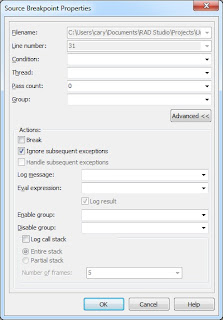
In situations where you do not want the debugger to pause the execution of your code in response to an exception, you have several options. As described in my previous article, you can set a non-breaking breakpoint at some point in your code prior to the execution of the code segment that raises the exception, and use the Ignore subsequent exceptions Advanced breakpoint option, shown in Figure 2, to instruct the debugger to ignore the exception.

Figure 2. The Breakpoint properties dialog box in Advanced mode
If you want to restored the normal operation of the debugger, you would then place a breakpoint downstream from the exception you want it to ignore and place another non-breaking breakpoint, and set its Advanced breakpoint property to Handle subsequent exceptions.
This approach, while effective, is time consuming to put into place. It requires you to anticipate those locations in your code where you want to ignore exceptions, and place corresponding pairs of non-breaking breakpoints on either side of these code segments to ignore and then to once again handle exceptions.
Ignoring Specific Exceptions
If you are only concerned about specific exceptions, there is a much easier alternative, which first became available in Delphi 2005. From the Language Exceptions node of the Options dialog box, shown in Figure 3, you can instruct the debugger to globally ignore specific exception hierarchies.
Figure 3. The Language Exceptions node of the Options dialog box
To do this, click the Add button to display the Add Language Exception dialog box, shown in figure 4. and add the name of the exception class that you want to ignore.
Figure 4. The Add Language Exception dialog box
Once added, this exception appears in the Exception Types to Ignore list of the Language Exceptions node of the Options dialog box. For instance, if you use the Add Language Exception dialog box to add an exception named EDivByZero, the Exceptions types to Ignore list will include EDivbyZero, as shown in Figure 5.
Figure 5. A newly added exception hierarchy will be ignored by the debugger
If you now run the previous code segment, the debugger will not pause your code upon encountering the division by zero exception. Likewise, it will also ignore any exceptions that descend from EDivByZero, meaning that this mechanism makes it easy to disable entire hierarchies of exceptions.
If, at a later time, you want to re-enable the debugger's normal behavior with respect to this exception (as well as those that descend from it), display the Language Exceptions page node of the Options dialog box, and remove the checkmark from the checkbox next to EDivByZero. Alternatively, you can remove this exception class from the Exceptions to Ignore list altogether by selecting that exception in the list and clicking the Remove button.
If you want to instruct the debugger to ignore every exception that it encounters, the process is even easier. Simply uncheck the Notify on language exceptions checkbox that appears at the bottom of the Language Exceptions node of the Options dialog box. When this checkbox is unchecked, the debugger ignores all language exceptions. (This checkbox can be seen in Figures 3 and 5).
To be honest, it would be unusual to add an exception, such as EDivByZero, to the Exceptions to Ignore list. Instead, you are more likely to add custom exceptions, those that you define for your own application, to this list. Specifically, you are more likely to add exceptions that you explicitly raise within your application by calling the raise keyword.
In general, it is considered a poor programming practice to raise an instance of one of Delphi's exception classes in your code. Instead, you should define your own exceptions classes, and raise one of them.
For example, you may define two classes of exceptions that you potentially raise at runtime from the code within your application. One of these may be raised due to simple user errors, errors that the user needs to be informed about. The other may be serious failures, ones that you cannot handle normally.
Here is an example of such a declaration:
type
  ECustomException class(Exception)
  end;
  EWarningException = class(ECustomException)
  end;
  ECriticalException = class(ECustomException)
  end;
Assuming that an EWarningException is raised by your code in response to a user's invalid input, this exception is one that you probably do not want the debugger to notify you of (while you are debugging the application). As a result, you probably do not want the debugger to display a dialog box like the one shown in Figure 1.
The simple solution for this problem is to instruct the debugger to ignore EWarningException instances, which is so say that you instruct the debugger to ignore your non-critical exceptions. That's the real power of the Exceptions to Ignore list.
Running without Debugging
When the debugger is active, unless you take steps to disable exceptions, raised exceptions cause the debugger to pause the execution of your code. One approach to preventing the debugger from pausing the execution of your application upon encountering an exception is to run your code without the debugger being active.
There are two ways to do this. One is to first compile or build your application, and then to run it outside of the IDE. In other words, after compiling or building your project, follow this by executing the resulting EXE creating during compilation.
Since Delphi 2005, there has been an easier way. You can select Run Run Without Debugging, or simply press Ctrl-Shift-F9. In Delphi XE it's even easier, since there is a Run Without Debugging button on the Debug toolbar.
When you run without debugging, Delphi will first compile your executable, if necessary. It will then run your application, but without the services of the debugger. This means that all breakpoints are ignored (whether they are breaking or non-breaking), and exceptions do not load the debugger.
One advantage of running without debugging is that the editor features, such as code navigation, code insight, and all other features of the editor, are active when you run without debugging. This means that you can test your running application, and at the same time make changes to and inspect the project from which the application was compiled.
But what if you encounter a problem while running without debugging, and you want to enable the debugger in order to examine what's going on? Here again, Delphi offers a powerful option. You can attach the debugger to the running process (this option also was introduced in Delphi 2005). Once you have attached to the running process, the debugger will be active without your having to stop and restart your application.
To attach the debugger to an application that is running without debugging, select Run Attach to Process. Delphi responds by displaying the Attach to Process dialog box shown in Figure 6.
Figure 6. The Attach to Process dialog box
If you want to immediately pause the application with the debugger active, ensure that the Pause after attach checkbox is checked before you click the Attach button. Personally, I usually leave this option unchecked, since I probably do not want the debugger to pause the application until it encounters a breakpoint or an exception that it is not instructed to ignore. Nonetheless, when you are ready to attach, click the Attach button.
Once attached, it is as if you had run the application with the debugger active. At this point, editor features such as code insight and class navigation are once again unavailable. However, once you are done using the debugger, you have the option to select Run Detach from Program, to once again return to a state where your application is running without the services of the debugger.
In closing, I want to mention one additional capability that the Attach to Process option provides you. If you are writing a DLL (dynamic link library) in the IDE, but this DLL is loaded by a process for which you do not have source code, you can use Attach to Process to debug your DLL.
Here's how you do it. When you are ready to debug your DLL, set your breakpoints and then compile the DLL program. Then, run the external program (the EXE) that will load your DLL.
Next, select Run Attach to Process. Use the Attach to Process dialog box to select the program that will load your DLL. Once you are attached, do whatever you need to do to cause that program to load your DLL. As soon as the attached process loads your DLL, and one of your breakpoints is encountered (or an exception is raised), Delphi's debugger will pause the execution inside your DLL source, permitting you to inspect variables, trace into, step over, or whatever else you need the debugger for. When you are done with the debugger, click the Run button or Press F9 to resume normal execution of the attached program.
Conclusion
While you need the services of Delphi's debugger, you do not necessarily need it all of the time. By learning how to instruct the debugger to ignore specific exceptions, as well as disable and enable particular breakpoints, you gain more control, and more precision, over your debugging tasks.
This posting is based on an article that I originally published in the Software Development Network Magazine (issue #107). This is the official magazine published by the Software Development Network (http://www.sdn.nl/).
Sunday, October 31, 2010
First Look at Advantage Database Server 10
With the release of Advantage 10, Sybase continues the tradition of consistent improvements to this high-performance, low maintenance database server. In addition to a rich array of additional features and feature enhancements, this release also includes a large number of internal optimizations that will improve the performance of most Advantage client applications simply by upgrading the server to Advantage 10. These improvements add significant value to the already impressive collection of features that make Advantage Database Server a perfect match for small to medium size database applications.
Overview
The Advantage Database Server (ADS) is a high-performance, low maintenance database server by Sybase. ADS supports an impressive set of features often found in high-end databases. These features, in combination with its ease of installation and nearly maintenance free operation, make it a favorite database for vertical market applications.
With each new release of Advantage, the Sybase team has consistently created added value by introducing new and enhanced features, as well as improving the already impressive performance of the server. This tradition continues with this release of Advantage 10.
This post is designed to provide you with a brief overview of the Advantage Database Server, followed by a look at the new and enhanced features found in Advantage 10. If you are already familiar with Advantage, you may want to go directly to the section New Features and Enhancements in Advantage 10.
Overview of Advantage Database Server
The Advantage Database Server provides a unique set of features that make it an ideal database for small to medium size applications. The major features that make Advantage special are described in the following sections.
High Performance
To put it simply, Advantage is fast. Much of its speed comes from its architecture, which is based on ISAM (indexed sequential access method) technology. ISAM makes extensive use of indexes to provide high-speed table searches, filters, and table joins.
Unlike other ISAM technologies, such as dBase and Clipper, Advantage Database Server is a transaction processing, remote database server. As a result, it provides application developers with a reliable, distributed solution for managing data using client/server technology.
Low Maintenance
The Advantage Database Server installs in minutes, and rarely needs attention after that. Indeed, unlike high-end database servers, most Advantage installations do not have a database administrator. This makes Advantage an ideal server for vertical market applications where the server may be installed in many facilities that do not have their own IT department.
Navigational and Set Based Orientation
While Advantage is based on the navigational ISAM architecture, it also supports industry standard SQL (structured query language), with most of the SQL operations optimized for lighting fast execution. As a result, Advantage is one of the rare remote database servers to support both the navigational model of data access as well as set-based SQL, giving you a wealth of options for presenting and managing your data.
Advanced Feature Set
The Advantage Database Server sports an impressive collection of features often only found in high-end database servers. These include security provided by users and groups, table encryption, and support for encrypted client/server communication. Additional high-end features supported by Advantage include stored procedures, SQL PSMs (persistent stored modules), views, user defined functions, table- and field-level constraints, referential integrity, online backup, triggers, notifications, and replication.
Scalable
Advantage comes in two basic flavors: the Advantage Database Server (ADS) and the Advantage Local Server (ALS). ALS is a free, file-server based technology whose API (application programming interface) is identical to ADS. ALS permits developers to deploy their Advantage applications royalty free to clients who do not need the stability and power of a separate database server.
Importantly, as the needs of those applications deployed with ALS grow over time, those applications can be almost effortlessly scaled to client/server technology, in many cases simply by deploying ADS. So long as the client applications are designed correctly, those applications will begin using ADS the next time they execute.
New Features and Enhancements in Advantage 10
Rather than reciting a laundry list of updates, I have organized the enhancements into the following sections: Major performance improvements, enhanced notifications, additions to Advantage SQL, nested transactions, Unicode support, additional 64-bit clients, added design-time support for Delphi, and side-by-side installation. For a detailed listing of all of the updates found in Advantage 10, see the white paper at the following URL:
http://www.sybase.com/files/White_Papers/Advantage_WhatsNewADS10_WP.pdf
Major Performance Improvements
The Advantage Database Server has always been recognized for its superior performance, being able to handle very large amounts of data with blinding speed. That makes it all the more remarkable that one of the most enticing aspects of upgrading to Advantage 10 involves performance. Specifically, the performance of database operations in client applications will improve simply by upgrading the server to Advantage 10. In some cases, these performance gains will be significant.
Many of the internal systems that contribute to Advantage's already impressive performance were evaluated by Advantage's R&D engineers. Where possible, improved algorithms were introduced, caching was implemented or enhanced, and resources were pooled. These changes resulted in more efficient indexes, improved transaction handling, and more intelligent management of resources such threads, record locks, and file writes.
The effects of these improvements range from nice to stunning. During Advantage 10's Beta cycle, one of the Beta testers reported the results of his performance tests on some of his larger queries involving, in some cases, millions of records. He found that some Advantage 10 queries executed 40 percent faster than the same queries in Advantage 9. In other cases, the Advantage 10 queries were exponentially faster (one query that ran in 2.7 seconds in Advantage 9 took about 1 millisecond in Advantage 10). The R&D team has found similar improvements during testing.
But SQL queries are not the only area of Advantage to benefit from these internal improvements. Operations that benefit from Advantage's support for navigational operations have also improved. In fact, the Help files for Advantage 10 list no less than 20 specific improvements or optimizations introduced in Advantage 10. And these updates affect everything from cascading referential integrity updates to record insertion, from memo file header updates to table creation, from low-level index operations to worker thread management. Simply put, the performance enhancements introduced in Advantage 10 alone make a solid business case for upgrading from an earlier version of Advantage.
Enhanced Notifications
Notifications are a feature originally introduced in Advantage 9, and they provide you with a mechanism by which Advantage can notify interested client applications that some change has occurred on the server. For example, a client application can subscribe to a notification in order to be informed when the contents of a specific table have changed. The client application can then use this information to update the end user's view of that data.
A small change to notifications in Advantage 10 has resulted in a very significant improvement in their utility: Advantage 10 notifications now support a data packet. This data packet, in the form of a memo field, permits you to include any data you like along with the notification. This data may include the record ID of the record that was affected in the table of interest, the connection id of the user who made the change, the type of change, or any other data you like.
This data permits you to implement advanced features in your notification-subscribing clients. For example, you can now distinguish between changes made by your client application's user and those made by other users. This information can be used to automatically update a user's view of data when someone else has made changes, ignoring those changes posted by that user.
Additions to Advantage SQL
There are many updates and additions to Advantage's support for the structured query language (SQL). Of these, my favorite update is the new ability to use a stored procedure in the FROM clause of a SELECT query.
If you have a stored procedure that returns a result set, you can treat that result set like a table in a SQL SELECT statement, permitting you to select specific fields or expressions from the result set, link the stored procedure result to other tables (or other stored procedure result sets), and define WHERE clause conditions to select just those records in which you are interested. You can even use the predefined Advantage system stored procedures in the FROM clause.
Another enhancement is the ability to use Boolean expressions in your SQL statements. For example, if you have a table named CUSTOMER in which a Boolean (logical) field named Active appears, the following query will select all records where the Active field contains True.
SELECT * FROM CUSTOMER WHERE Active;
In previous versions of Advantage, you would have to form your query like the following:
SELECT * FROM CUSTOMER WHERE Active = True;
Also, TOP queries now support a START AT clause, which permits you to select a specific number of records beginning from some position in the result set other than the top. For example, the following query will return records 11 through 15 from the CUSTOMER table, ordered by last name.
SELECT TOP 5 START AT 11 FROM CUSTOMER ORDER BY LastName;
A collection of bitwise SQL operators have also been introduced. These include AND, OR, and XOR, as well as >> (right-shift) and << (left-shift).
There is also a new SQL scalar function: ISOWEEK, which returns the ISO 8601 week number for a given date (it is also a new expression engine function). And, some of the SQL scalar functions that were previously not expression engine function are now. These include DAY, DAYOFYEAR, DAYNAME, and MONTHNAME, to name a few. These are in addition to CHAR2HEX and HEX2CHAR, which are newly added expression engine functions. Support in the expression engine means indexes can now be created using these functions, which in turn allows the Advantage query engine to fully optimize restrictions that use these scalars.
Finally, there are a number of new system stored procedures and system variables. The following are just a few of the new system stored procedures available in Advantage 10: sp_SetRequestPriority, sp_GetForeignKeyColumns, and sp_IgnoreTableTransactions.
As far as system variables go, among the new variables are ::conn.OperationCount (number of operations performed on this connection), ::stmt.TrigEventType (the event type of the executing trigger), ::stmt.TrigType (the type of trigger executing), and ::conn.TransactionCount (the current nesting depth of nested transactions).
Nested Transactions
Speaking of nested transactions, Advantage 10 now supports them. In previous versions of Advantage, code executing in an active transaction could not attempt to start a transaction without raising an exception. This is no longer the case. As a result, if you write a stored procedure whose operations should be performed in a transaction, you can safely call BEGIN TRANSACTION, even if that stored procedure is called by code where a transaction is already active.
New Table Features
Several interesting new table-specific features have been introduced in Advantage 10. Several of these are related to transactions and table caching. Let's consider table caching first.
To begin with, so long as memory resources permit, temporary tables are now kept entirely in cache. As a result, operations that rely on temporary tables are usually very fast.
There is also a new table property called Table Caching. Most tables are created with Table Caching set to None. These tables are not cached, and any changes to these tables are written to the underlying file immediately.
When Table Caching is set to either Read or Write, the corresponding table is kept in cache while it is open, making its data highly available. These settings are normally used for data that is largely static, and which can be reconstructed if the table becomes corrupt. Specifically, tables held in cache are not written to disk except when the table is closed. As a result, changes to their data will be lost if Advantage unexpectedly shuts down without being able to persist those tables' contents (for instance, if there is a sudden failure of your server's power supply). However, this functionality can be very useful for static data (zip codes, part numbers, and so forth).
The transaction free tables feature is also a table property, called Trans Free Table. When set to True, the associated table does not participate in transactions.
There are two implications of a table not participating in an active transaction. First, changes made to a Trans Free Table during a transaction are not rolled back even if the transaction itself is rolled back. Second, changes to data in a Trans Free Table are not isolated during a transaction, being immediately visible to all other client applications, even though the transaction has not yet been committed.
Just like when a table's Table Caching property is set to Read or Write, Trans Free Table is set to True only for special tables in most applications. For example, you may use a table to log a user's actions in an application. In those cases, you may want to log that a user tried to perform some task, even though the action may fail and the user's changes may be rolled back.
Similarly, you may have a table used for generating unique key field values. This table may have a single record and single field that holds an integer value. A client needing a key would lock this table, read the key, increment the integer, and then release the lock.
With such a table, the incremented key needs to be visible to all client applications, even if individual clients increment the key from within a transaction. If such a table were not a Trans Free Table, other clients would not be able to access the incremented key until the transaction was committed, rendering the table useless for its intended purpose.
Unicode support
Although Unicode support is arguably a table feature, its significance warrants separate consideration. In short, Advantage 10 introduces three new field types. These types, nchar, nvarchar, and nmemo, are UTF-16 Unicode field types. The nchar type is a fixed length Unicode string field and nvarchar is a variable length Unicode string field. The data for these two field types are stored entirely in the table file.
The nmemo field, by comparison, is a variable length Unicode field that is stored in the memo file. Together, these three fields provide you with a number of options for storing Unicode symbols and characters in Advantage tables.
More 64-bit Clients
Advantage 9 introduced 64-bit versions of both the Windows and Linux Advantage servers, as well as 64-bit clients for the Advantage Client Engine (ACE) and the Advantage .NET Data Provider. A number of additional 64-bit clients have been added in Advantage 10, including 64-bit versions of the OLE DB Provider, the ODBC driver, as well as the Linux PHP driver. The Advantage Data Provider for .NET has also been enhanced to use the appropriate 64-bit or 32-bit drivers, depending on the OS on which your managed code is executing.
In addition, 64-bit versions of the Advantage Local Server (ALS) and Advantage backup utility have been introduced in Advantage 10.
Added Design-Time Support in Delphi
The SQL Utility, a comprehensive SQL editor and debugger, is now exposed as a property editor directly within the Delphi IDE (integrated development environment). To use the SQL Utility within Delphi, select the ellipsis button on the SQL property in Delphi's Object Inspector when an AdsQuery component is selected.
Using the SQL Utility, you can check the syntax of your SQL, execute it, and even set breakpoints and debug your SQL scripts. Once you are satisfied with your SQL, click the Save button on the SQL Utility toolbar (or press Ctrl-S) to save your SQL to the SQL property of the AdsQuery.
The Advantage Delphi Components also include a new component, TAdsEvent. This component, which you can use to subscribe to and handle notifications, allows you to easily configure and manage the handling of asynchronous events.
Side-By-Side Installations
With Advantage 10, it is now possible to run two or more instances of the Advantage server on the same physical server, even different versions of Advantage. For example, it is now possible to run Advantage 9 and Advantage 10 on the same server. This feature is particularly useful for vertical market developers whose applications need to support more than one version of the Advantage server.
Conclusion
With the release of Advantage 10, Sybase has once again confirmed its commitment to this unique and valuable database server. In addition to a number of useful additions and enhancements, Advantage 10 also includes a wide range of performance improvements that will improve the performance of most client applications merely by installing this updated server.
Most developers, however, will also want to update their client applications to benefit from the many enhancements found in Advantage 10. From support for Unicode to greatly improved notifications, from updated SQL syntax to enhanced table features, Advantage 10 has something for everybody.
Want to Learn More
Loy Anderson and I have released the latest edition of our Advantage book, Advantage Database Server: A Developer's Guide, 2nd Edition with extensive coverage of ADS 10. For more information and to order this book, please visit:
http://www.jensendatasystems.com/ADSBook10/

Subscribe to:
Posts (Atom)


